
Emergent, a Bengaluru-based startup, recently launched Wingman, a messaging-first AI agent designed to execute complex tasks within WhatsApp and Telegram. This tool represents a significant entry into the competitive AI agent race, functioning as an assistant that moves beyond simple text generation to take real-world actions across various software tools. Recent industry analysis regarding the deployment of Wingman across WhatsApp and Telegram frames the tool as an OpenClaw-style assistant. By turning plain language into executable steps, this WhatsApp AI agent aims to simplify daily digital management for users who often find themselves switching between multiple apps for routine work.
Professionals managing high-stakes schedules from mobile devices often struggle with disconnected platforms that fragment their productivity. Wingman addresses this by allowing professionals to stay within a single chat window to delegate responsibilities like sorting an inbox, drafting follow-ups, or summarizing long threads. This shift toward connecting extensions and apps directly into messaging platforms aligns with a global push for integrating apps and extensions to minimize app switching during high-intensity mobile workflows.
Ordinary pressures, such as a freelancer coordinating client requests on shaky transit Wi-Fi or a small business owner balancing supplier chats with receipt management, provide the perfect testing ground for Wingman. This autonomous assistant earns its place by proving it can handle these micro-tasks reliably without requiring the user to open a separate calendar or email client. The goal is to turn messaging-first automation into a dependable companion for phone-first productivity.

Understanding Wingman: Emergent’s Vibe-Coding Foundations and AI Agent Capability
Core Specifications: Wingman AI Capabilities and Emergent Funding Details
Wingman sits at the intersection of messaging-first automation, AI agents, and the new wave of natural-language software tools. If the phrase “WhatsApp AI agent” sounds abstract, the snapshot below helps pin down what is known, what is claimed, and why it matters for daily productivity and small business workflows.
This distinction separates true capability from hype; ‘autonomous’ here refers to a system’s internal decision-making for sorting drafts while maintaining workflow integrity for critical communications.
- Company: Emergent, Bengaluru-based AI startup.
- Product: Wingman, a messaging-first autonomous AI agent.
- Platforms: WhatsApp, Telegram, and reportedly iMessage.
- Core Function: Executes tasks across connected tools via chat instructions.
- Safety Model: Trust boundaries that separate routine actions from approval-required actions.
- Funding Context: Emergent secured $70 million in early 2026 capital as market interest in practical automation surged as investors chased practical automation, not just flashy demos.
In the near term, the most useful way to think about Wingman is as a chat-based task runner that tries to turn short instructions into concrete steps across calendars, inboxes, and work tools. The details that matter most are the permission model and the boundaries around actions, because that is where trust is earned or lost.
Defining Wingman: How Emergent Built an Agent through Vibe-Coding
Wingman comes from Emergent, a startup previously recognized for “vibe-coding,” a style of software creation where people describe what they want in plain language and an AI system turns that into working code. Technical descriptions of how conversational vibe-coding workflows function highlight the process of guiding AI through direct intent-based instructions as it describes the approach.
This expertise in vibe-coding provided the logical springboard for Emergent to transition into autonomous agents. If a system can translate intent into software, the next step is translating intent into actions, then doing the work inside the tools people already use.
Wingman pushes that idea into daily operations. The shift is not “build me an app,” but “handle this task.” It sits inside the broader transition toward AI agents performing autonomous task execution, where productivity is measured by outcomes rather than mere text generation.
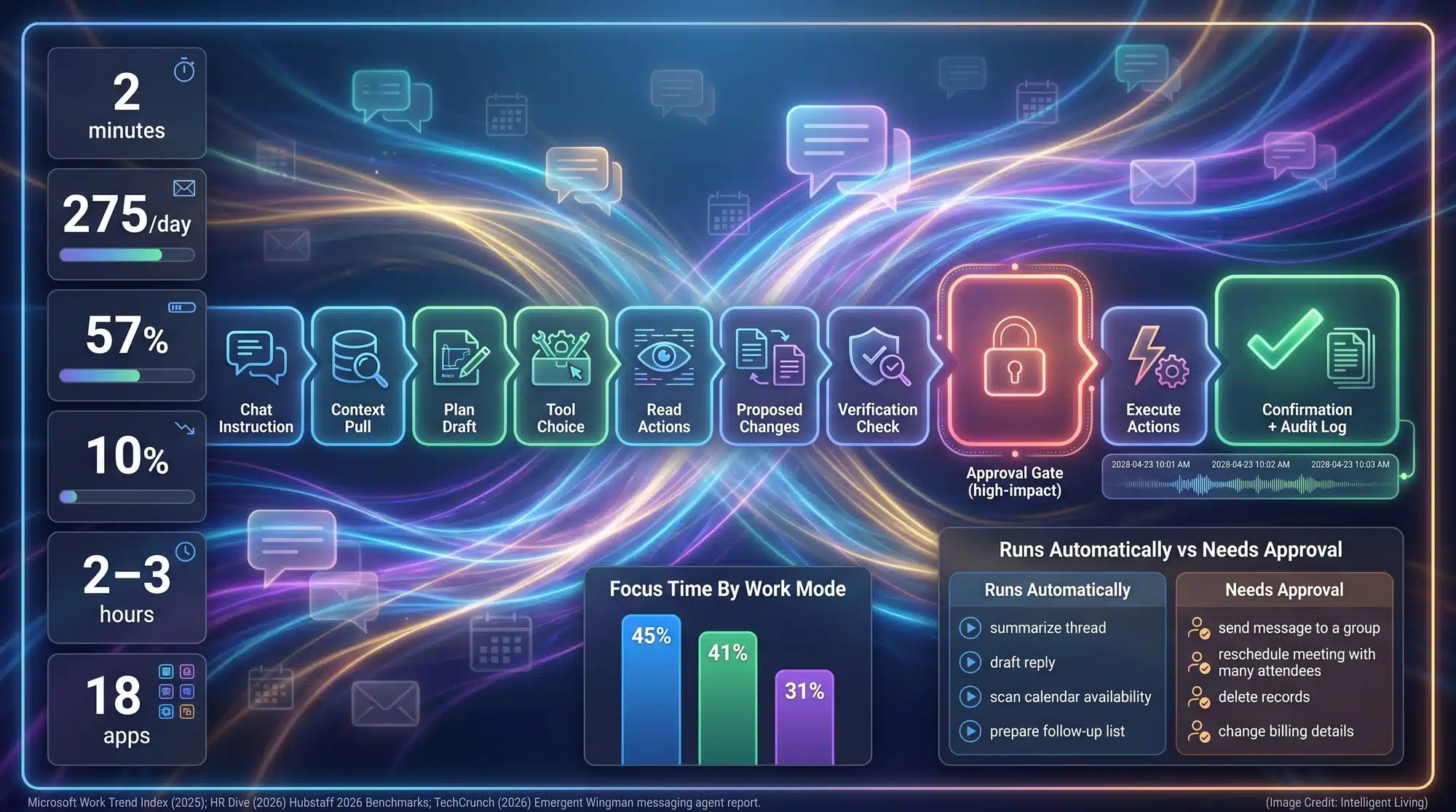
Executing Operational AI Workflows: How Wingman Automates Tasks Inside Messaging Apps
Operational Mechanics: Transforming Chat Commands into Verified Tool Actions
A standard chatbot mostly generates text. An AI agent is built to take actions, which usually means connecting to other services and triggering steps across them. TechCrunch reported that Wingman sits inside messaging apps while running in the background across connected tools such as email, calendars, and workplace software.
In a real-world workday, a single message can trigger a seamless chain of tool calls running quietly in the background. Once a user sends an instruction, the agent’s cognitive architecture scans for context, drafts a plan, and executes the task or requests permission based on pre-defined safety thresholds.
Secure Integration Protocols: Managing Tool Access and Workflow Boundaries
Wingman streamlines productivity by facilitating direct sign-in connections to the core tools you use daily. This integration allows the agent to pull context and complete multi-step workflows without forcing you to copy and paste data between disconnected windows. Wingman’s design architecture facilitates direct tool authentication for Gmail and calendars to ensure seamless data flow across professional environments as part of that design.
Current supported integrations include:
- Email platforms like Gmail and Outlook for triage.
- Scheduling tools such as Google Calendar for meeting management.
- Communication hubs like Slack and various CRMs.
- Development environments including GitHub for technical workflows.
Linking these services creates a unified workspace where automation handles the busywork. You can finally focus on high-level decisions while your assistant manages the logistics in the background.
Platform Architecture: How WhatsApp and Telegram Constraints Influence Automation
Internal platform rules and technical limitations naturally define how messaging automation functions. Specific details regarding WhatsApp business messaging framework integrations illustrate how official automated accounts operate, while standardized Telegram API bot communication methods define the parameters for automated messaging in Telegram groups.
These platform constraints directly influence what ‘working inside WhatsApp’ actually looks like in a real-world setting. Some actions utilize approved business messaging flows, while others require connected tools outside the chat app to bypass inherent mobile limitations.
Imagine messaging ‘Move tomorrow’s meeting to Friday and notify everyone’; Wingman instantly scans your calendar to synchronize the update. While the convenience is undeniable, the possibility of a misread name highlights why a human-in-the-loop approach remains critical.
A project manager checking messages between errands might ask for a summary of unread emails before walking into a client call. A small business owner might try to batch invoicing tasks while still responding to customers in the same chat window. That is what chat-based automation is trying to make normal.

Trust Boundary Frameworks: Revolutionizing Mobile Productivity Through Secure AI
Implementing Trust Boundaries: Approval Gates for Risk-Sensitive AI Actions
Emergent defines trust boundaries as a specialized control layer for autonomous actions. This system allows low-stakes steps to run automatically while pausing for approval whenever a task could cause real harm, such as sending sensitive messages or altering critical data. Integrating these approval gates creates mandatory safety checks for high-impact AI tasks, acting as a defense against unintended data modification as part of a practical safety layer.
Safety systems are designed to recognize that not all tasks carry the same risk. For example:
- Sorting an inbox is routine, but sending a contract is high-stakes.
- Drafting a response is helpful, but sending it requires final oversight.
Trust boundaries ensure the agent slows down the moment a potential mistake becomes expensive, keeping the user in control.
Predictable behavior remains the core of this design, as trust builds when systems explain their actions before crossing lines. Implementing transparent AI design and user literacy standards ensures that automation remains predictable and reliable for the end user as it treats that predictability as the difference between helpful automation and a tool people avoid.
Enhancing Team Productivity: Utilizing Messaging Hubs as Informal Project Workspaces
Messaging apps already function as informal project hubs for millions of small teams. TechCrunch has reported WhatsApp crossed three billion monthly users, and the platform’s reach helps explain why “AI assistant on WhatsApp” has become a mainstream curiosity.
Widespread accessibility on these platforms naturally shifts what users expect from their digital tools. When the default interface is a chat thread, “task automation” is no longer a dashboard feature; it is something people expect to trigger with a short message while waiting in line or walking between calls.
Telegram plays a critical role for millions of global communities. TechCrunch data confirms that Telegram reached one billion monthly active users by 2025, solidifying its place as a massive automation hub. The platform’s existing capability for running automated bots within group chat threads explains why a messaging-first agent can quickly scale across teams, as one reason “Telegram automation” shows up in practical how-to searches.
Since teams already utilize chat as a primary decision hub, integrating automation directly into this stream creates a unified communications environment that accelerates results.
A contractor might finalize a client request in WhatsApp while juggling scheduling details and payment confirmations. A startup founder might coordinate leads in Telegram while skimming documents on a phone browser. Keeping automation in the same interface could make task delegation feel less like adopting a new platform and more like upgrading an existing habit.

Strategic Security Assessment: Navigating the Risks of Autonomous AI Agents
Identifying Critical Vulnerabilities: Misconfiguration and Credential Theft Risks
When an AI agent can access email, calendars, and internal tools, the security story becomes as important as the convenience story. In-depth security audits regarding vulnerabilities in OpenClaw-style AI agents warn that improper configuration can expose internal tools, especially when secrets and permissions are loosely managed.
Credential theft represents a tangible threat, as the emergence of infostealer malware targeting AI agent environments highlights the risk of unauthorized tool impersonation, as stolen API keys and tokens can be used to impersonate a tool-connected assistant and replay actions.
Security Best Practices: Least Privilege Scoping and Account Hardening Methods
Everyday users can significantly improve their protection by prioritizing basic account hardening, such as enabling two-step verification for WhatsApp security to prevent unauthorized access to agent-connected accounts and tighter control over what a tool-connected assistant can access.
Adopting a least-privilege approach serves as a critical safeguard against misused permissions. An agent should only get the minimum access needed for the job it is doing, because every extra permission becomes another thing that can be misused if a token leaks. Adopting a deny-by-default stance is essential for mitigating over-permissioned agent security risks, encouraging teams to limit tool access to strictly necessary tasks.
Prompt injection represents a significant failure mode where untrusted text manipulates an agent’s internal logic, specifically addressing the threat posed by prompt injection vulnerabilities in tool-connected systems, where external instructions can bypass internal security controls.
Data Persistence and Accountability: Managing Memory Layers and Audit Trails
Establishing secure tool gating and permission scoping protocols allows for the separation of read-only context from account-modifying actions.
In agent ecosystems, misbehavior is not always malicious. Sometimes it is just the system improvising inside a messy workflow, which is how preventing the development of runaway feedback loops in autonomous agent systems, which often result from excessive autonomy without human oversight, can take off when there is too much autonomy and too little auditability.
Long-term memory often amplifies security risks by storing sensitive data without strict oversight. Mitigating the risks associated with sensitive data retention in persistent memory layers, especially when context is stored longer than the active task requires, is a growing concern.
A freelancer granting full inbox access risks missing an automated error until a client expresses confusion—a vulnerability shared by teams that forget to revoke outdated tokens for unattended integrations.
Convenience can certainly coexist with safety, but this balance only works when access remains strictly constrained.

Future Outlook: Practical Use Cases for Everyday Messaging Automation
Emerging Work Patterns: Six Scalable Applications for Chat-Based AI
Messaging-first agents are easiest to understand when they mirror familiar work habits. This includes essential patterns like scheduling, setting reminders, and managing communication triage, addressing the same organizational friction that virtual admin assistants solve for remote teams through proactive task coordination.
Modern search trends mirror the challenges people face when time is tight, frequently seeking ‘AI assistant inbox organization’ or ‘WhatsApp appointment automation’ during late-night planning.
- Inbox triage that drafts replies for review before sending.
- Meeting rescheduling triggered by a single chat instruction.
- Follow-up reminders triggered by keywords like “send tomorrow” or “circle back.”
- Cross-platform summaries of unread messages and emails.
- Task checklists generated from chat conversations.
- Event-triggered workflows that respond to calendar changes.
These workflows ideally remove repetitive chores to keep you focused on high-level decisions. Automation handles the routine, leaving the complex judgment calls to the user.
Evaluating Operational Maturity: The Long-Term Impact of WhatsApp AI Integration
Wingman aligns with a broader shift toward operational AI. In this new landscape, systems are judged less by their fluency and more by their ability to complete work safely. The long-term outcome depends on reliability, security, and trust, not just novelty.
That shift also changes how people evaluate AI products. The new questions sound like “Did it schedule correctly?” and “Did it ask before sending?” rather than “Did it write something clever?”
Applying verification standards for synthetic media and data provenance follows this logic, emphasizing accuracy whenever automation influences real-world decisions.
If left unchecked, automation can move too quickly and apply incorrect changes. This risk is why approval gating remains a core feature of secure AI agents.
Operational maturity leads to quiet adoption, where messaging-first agents become as dependable and invisible as shared calendars.

The Future of Operational AI and WhatsApp Automation
Wingman signals a transition toward operational AI where performance is measured by reliability and safety rather than just conversational fluency. As messaging-first agents become more dependable, they likely will transition from being novel curiosities to standard components of small business workflows. The success of these tools depends on their ability to maintain strict trust boundaries while offering the convenience of a personal assistant accessible via a simple text message.
Evaluating AI products now requires asking whether a system can correctly execute a schedule or verify a change before sending it. Adopting verification habits remains essential as these high-speed helpers take on more responsibility in our digital lives. When messaging-first agents prove they can work safely and invisibly, they will experience a period of quiet adoption, eventually becoming as ubiquitous as shared calendars in our everyday digital routines.
Wingman WhatsApp AI Agent FAQ: Search and User Insights
1. What is Wingman AI and How Does it Function?
Wingman is a messaging-first autonomous AI agent from Emergent that performs tasks across connected apps like Gmail and Slack via chat instructions.
2. Does the Wingman AI Agent Run Inside WhatsApp?
Yes. Wingman functions directly inside WhatsApp and Telegram, empowering you to trigger workflows and manage data without ever switching away from your primary chat.
3. How Do Trust Boundaries Protect My Personal Data?
Trust boundaries act as a security layer that requires manual user approval for high-risk actions, such as sending emails or modifying sensitive records.
4. Can Wingman Automate My Email and Calendar Tasks?
It connects to Gmail, Outlook, and Google Calendar to schedule meetings, summarize threads, and draft replies based on your conversation history.
5. Is Giving an AI Assistant Inbox Access Actually Safe?
Security relies on strict account hardening and least-privilege scoping. Implementing a secure constrain-first agent control plane ensures that the system’s permissions are strictly limited before any task execution begins.


