
Most gaming desks are sold on features. RGB lighting, a built-in cup holder, a shelf for the console, and cable routing cut into the frame. Almost none of them are sold on the only measurement that determines whether the desk is comfortable: your own seated elbow height. That is the number everything else derives from, and it is the reason two people can buy the same desk and have completely different experiences of an eight-hour session.
There is also a more important framing to get right. An ergonomic gaming desk is not a desk with a gaming label attached. It is a desk that fits a specific body at a specific height, with enough clearance and depth to allow the rest of your setup to be positioned properly. If the surface height is wrong, no amount of accessory design rescues it. If the surface is right but your monitor is forty centimeters from your nose, the desk has not solved the problem.
This guide sets out the measurements that matter, where they come from, and how to check your own setup in about five minutes. It also covers the part most gaming desk guides get wrong: the evidence on sit-stand desks, which is far more equivocal than the marketing suggests. Investing in the right game room equipment matters, but only if the desk itself is fitted to you first.
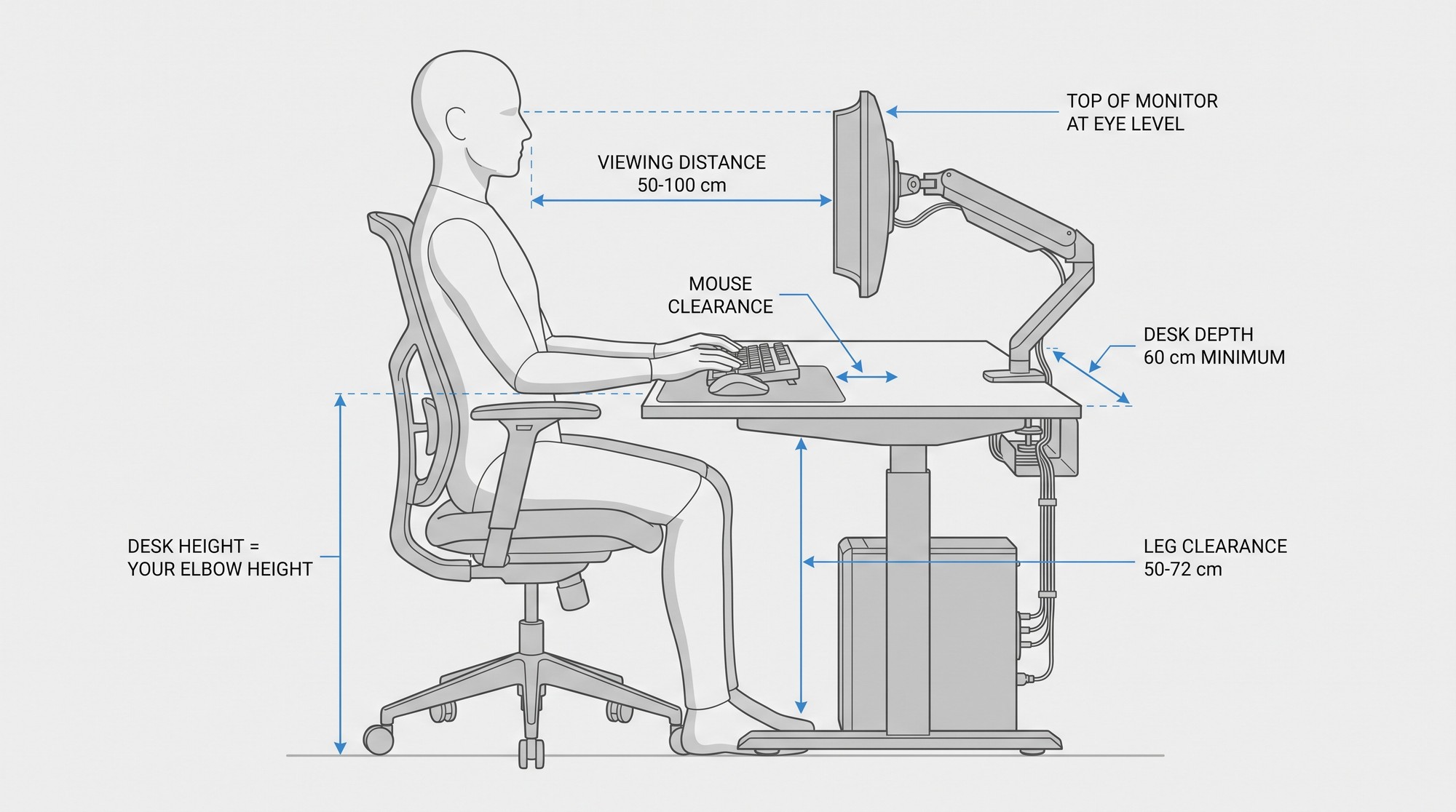
Ergonomic Gaming Desk Quick Reference
If you only remember five numbers from this guide, these are the ones that decide whether your current desk fits you. Measure before you buy anything.
- Your desk height is your seated elbow height. Sit, feet flat, arms at your sides, bend your elbows to 90 degrees, and measure from the floor to the underside of your forearm.
- Leg clearance: 50 to 72 cm. Check it while seated, not while the desk is raised.
- Desk depth: 60 cm minimum at foot level and 44 cm minimum at knee level. Depth is what makes viewing distance and mouse clearance possible at the same time.
- Monitor: 50 to 100 cm from your eyes, with the top of the screen at or slightly below eye level and the center 15 to 20 degrees below your horizontal line of sight.
- Add about a centimeter for your keyboard so your forearms land level rather than angling down onto tall keycaps.
What Actually Makes a Gaming Desk Ergonomic?
Which gaming desk is the most ergonomic?
The most ergonomic gaming desk is not a particular brand or style. It is the one whose height, depth, and clearance match your body. Occupational health guidance is unusually consistent on this point, and notably it does not prescribe a single height for everyone. The European Agency for Safety and Health at Work states plainly that where desk height is adjustable, you should adapt it to elbow height with the shoulders relaxed. The US Occupational Safety and Health Administration makes the same point from the opposite direction, recommending height-adjustable desks and leg clearance in the range of 50 to 72 cm.
So if you want a single answer to which gaming desk is most ergonomic, it is the one that lets you set the surface to your elbow height, clear your knees underneath it, and place your screen at a comfortable distance once the height is right. Style, color, and lighting are irrelevant to that question.
The five measurements that matter
These are the dimensions worth knowing before you buy, with the sourced guidance for each. Every figure below comes from occupational safety guidance or peer-reviewed ergonomics research rather than a manufacturer specification sheet.
| Measurement | Guidance | Why it matters at a gaming desk |
|---|---|---|
| Desk surface height | Set to your seated elbow height, shoulders relaxed | Determines wrist, shoulder, and neck angle for the entire session |
| Leg clearance | 50 to 72 cm under the desktop | Too low, and your knees hit the frame, which pushes your whole posture forward |
| Work surface depth | At least 44 cm at knee level, 60 cm at foot level | Depth is what makes a real viewing distance possible without moving the screen forward |
| Monitor viewing distance | 50 to 100 cm from your eyes to the screen | Holds the whole screen in view without leaning or refocusing constantly |
| Monitor height | Top of screen at or slightly below eye level; screen center 15 to 20 degrees below horizontal | Removes sustained upward neck extension, the main driver of gaming-related neck pain |
Set the Desk Height First, Then Fit Everything Else
How to find your correct desk height in five minutes
Do this before you buy anything, including a monitor arm. The order matters, because if you set your monitor first and then change your desk height, your monitor is wrong.
Sit in your gaming chair with your feet flat on the floor and your back against the backrest. Let your arms hang loosely at your sides. Now bend your elbows to roughly 90 degrees. The height at which your forearms sit is your working surface height. That is your number.
For most adults this lands somewhere in the low to mid seventies in centimeters, but treat that as a sanity check rather than a target. A common rule of thumb is that seated desks cluster around 71 to 76 cm, and adjustable frames typically span roughly 50 to 69 cm near the user. If your measurement falls outside the frame’s range, the frame is wrong for you, not the other way round.
OSHA’s recommended range for keyboard position is an elbow flexion of 70 to 135 degrees, which is a wider window than most product pages suggest. Mayo Clinic guidance is more specific still, recommending that your hands rest at or slightly below elbow level while typing, with wrists and forearms in line. If you are reaching up to the keyboard, you are too low. If your shoulders are lifting to meet the keys, you are too high.
One adjustment most people miss: account for the thickness of your keyboard. A desk measured with bare forearms on the surface will sit slightly low once you add a mechanical keyboard with a tall case, and a thick desk mat does the same job in reverse.

Is an adjustable gaming desk worth it?
Worth it if more than one person uses the desk, if you want to alternate between sitting and standing, or if your elbow height sits at either end of a fixed frame’s range. Not worth the premium if you are buying alone, you have measured your height, and a fixed desk lands within a centimeter or two of it. In that case the money is better spent on a monitor arm and a proper chair.
There is one ergonomic argument for height adjustment that is not about standing at all, and it is the strongest one. Research on postural variability in computer work has found that when between 20 and 60 percent of work is done standing rather than sitting, postural variability during computer work increases by up to three times. An adjustable desk does not just let you stand. It lets you change, and changing is the variable that seems to matter most. That is a better reason to buy one than any health claim about standing.
When you are comparing gaming desk options, run this measurement against every one of them. Any desk that cannot reach your elbow height is eliminated immediately, and that single test will narrow a long list very quickly.
Monitor Placement Is Where Most Setups Go Wrong
Gaming introduces one ergonomic problem that general office guidance does not really cover: the size of the screen. A 27-inch monitor and a 49-inch ultrawide are not the same object, and treating them as interchangeable is why so many players end up with a stiff neck and tired eyes.
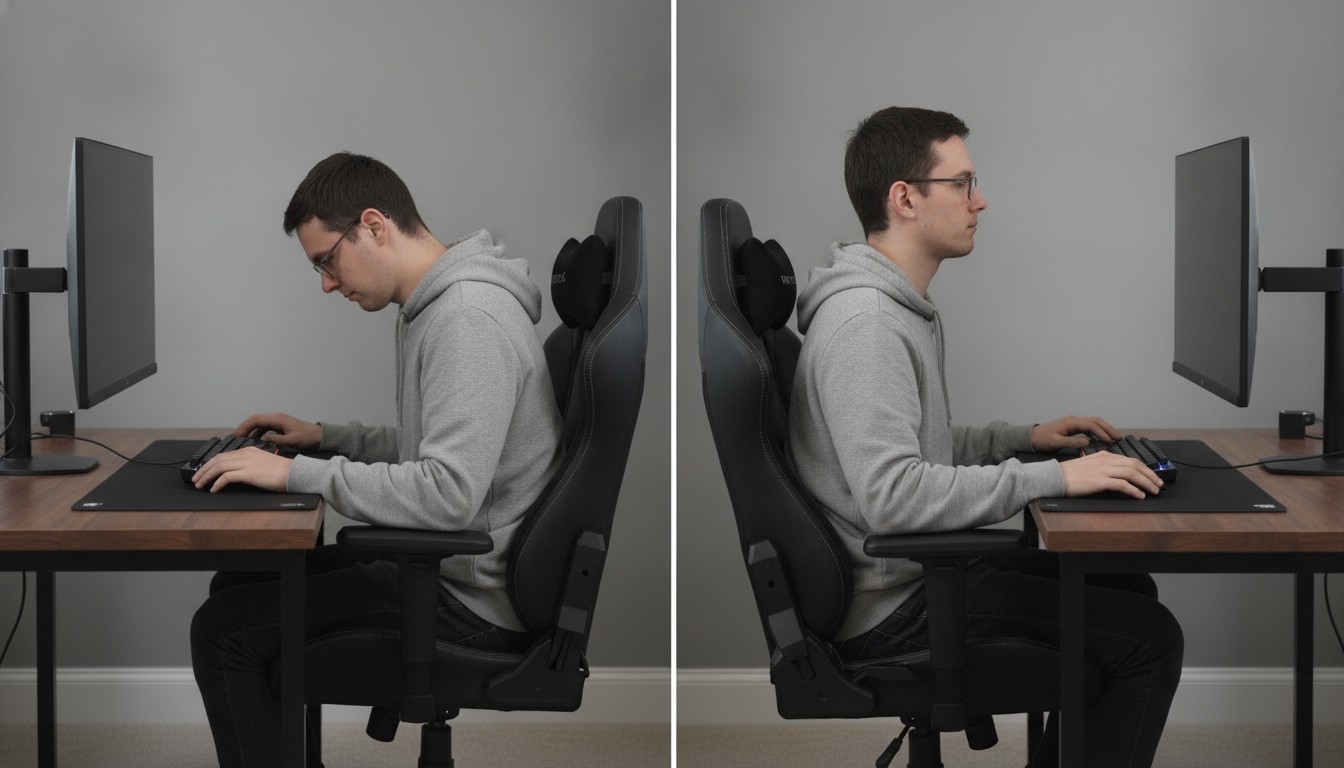
The baseline from both OSHA and Mayo Clinic is the same. Place the monitor directly in front of you, no closer than 50 cm and no further than 100 cm from your eyes, with the top of the screen at or slightly below eye level and the center of the display 15 to 20 degrees below your horizontal line of sight. OSHA also advises that monitors should not sit more than 35 degrees to the left or right of your head, which rules out a lot of casual three-monitor arrangements.
If you wear bifocals, Mayo Clinic recommends lowering the monitor a further 2 to 5 cm, because your reading segment sits lower than your straight-ahead gaze. This is one of the most commonly missed adjustments, and it is specific to people over roughly forty-five.
Ultrawide and multi-monitor setups
An ultrawide monitor needs more distance than the standard range comfortably allows, and a shallow desk makes that impossible without pushing the screen forward, which defeats the purpose. This is the single strongest ergonomic argument for buying a deeper desk than you think you need. Sixty centimeters of depth is the OSHA minimum at foot level, and it is a genuine minimum rather than a comfortable target.
The 50 to 100 cm guidance was written with standard displays in mind. Larger screens need more distance to hold the whole image comfortably. Treat the upper end of that range as your target for anything above about 34 inches, and be honest that a 49-inch ultrawide will often sit beyond it. The correct response is depth, not tolerance.
For multi-monitor setups, put your primary gaming display directly in front of your body. Secondary screens for chat, a game guide, or a performance overlay belong immediately beside it and are angled inward, not spread across the desk where you have to rotate your neck. Keep the tops of both screens at the same height, and check that your neck stays neutral when your eyes move between them. If you cannot read the far edge of a side screen without turning your head, it is too far out or too low.
A monitor arm solves most of this in one move. It decouples screen position from desk height, which means you can set the desk to your elbow height and then position the screen independently. It also frees the rear surface, which matters for a setup with a desktop tower and cable management. This is one of the few accessories on a gaming desk that has a clear ergonomic justification rather than a cosmetic one.
Is a Sit-Stand Desk Good for Gaming?
What the evidence actually says
Here is the honest version, and it is more nuanced than either the enthusiast blogs or the sceptics suggest.
The Cochrane review on workplace interventions for reducing sitting pooled 34 studies covering 3,397 participants. It found that sit-stand desks reduced sitting at work by an average of about 100 minutes per workday at short-term follow-up, falling to roughly 57 minutes per day at medium-term follow-up. The critical detail is how that evidence was graded. Cochrane rated the evidence low quality, and the review’s own conclusion is that the health effects of sit-stand desks remain unproven.
A 2025 systematic review looking at full-day as well as workplace sedentary behaviour found more encouraging durability: reductions of 68.7 minutes per day at three months, 77.7 minutes at six months, and 62.1 minutes at twelve months. So the sitting reduction appears to hold. What has not been established is that reducing sitting this way translates into better health outcomes.
That distinction is routinely lost, and it matters for a gaming desk specifically. A separate large-scale study of device-measured sitting and standing found that standing time alone did not lower major cardiovascular disease risk, and that very long stretches of standing may actually increase the risk of orthostatic circulatory conditions. Standing all day is not the target. The defensible claim is narrower and still worth making: an adjustable desk makes it easy to break up long unbroken sitting blocks, and that is a good reason to have one.
For gaming specifically, the benefit is plausibly greater than for desk work, because a match or a session has natural breaks built into it. Standing between rounds or during a queue gives you a reason to change position that an eight-hour office shift does not.
What is the 20-8-2 rule for standing desks?
This is worth addressing directly because it is quoted constantly and almost always presented as if it were established clinical guidance. The 20-8-2 pattern, twenty minutes sitting, eight standing and two minutes moving in each half hour, comes from Professor Alan Hedge of Cornell University, and it is published on the Cornell University Ergonomics Web. Its own author describes it as a ball park goal.
Two things are often left out. The British Journal of Sports Medicine expert statement on sitting and standing, which is frequently cited alongside the rule, contains no 20-8-2 pattern and no sit-to-stand ratio of any kind. And no authority has established that any specific ratio is optimal, because nobody has run the head-to-head comparison.
That said, the underlying idea is sound and has some support. A study conducted at an active workstation found that using the 20-8-2 pattern did not impair task or cognitive performance, appeared to improve task performance over time, and meaningfully increased energy expenditure compared with sitting throughout. The movement component is the part with the clearest evidence behind it, and it is the part most people drop. If you use this rule, keep the two minutes. A two-minute stand that you never leave the desk for is just a worse chair.
What desk do most pro gamers use?
Honestly, there is very little public data on this. Teams do not publish desk specifications, and most players who stream use whatever arrangement their sponsors provide, which skews towards a fixed-height desk with a monitor arm. Anyone claiming to know the definitive pro setup is guessing.
What is observable from professional play is not the desk but the outcomes. Players who have long sessions tend to have their monitor on an arm rather than a stand, their feet supported, and their forearms resting rather than hovering. Those are the three markers worth copying, and none of them require an expensive desk to achieve.
Mouse, Keyboard and Controller Clearance
The input device is where a gaming desk differs most from an office desk, and it is the most commonly specified dimension on gaming desks. A mouse needs somewhere flat to move, and it needs that space to be reachable without extending your arm past your elbow.
If you use a keyboard without a number pad, the mouse naturally sits closer to your body, which is better. If you use a full-size keyboard, offset it slightly to the left rather than centring it, so the mouse lands beside your shoulder rather than out in front of your chest. Above roughly 27 inches of desk depth you have room to do this properly. Below it, you will compromise somewhere.
Wrist position matters more than wrist support. Mayo Clinic guidance is to keep your wrists straight, upper arms close to your body, and hands at or slightly below elbow level while using a mouse or keyboard. A wrist rest is useful for pausing between actions, but resting your wrists on a raised pad while actively mousing pushes the wrist into extension, which is the opposite of what you want.
For controller play, the requirement is different again and almost never mentioned. Your forearms need support, because a controller session has no natural place to rest your arms the way a keyboard does. A desk edge or armrests at roughly elbow height will prevent the shoulder flare that comes from holding both arms up, and that flare is what produces the shoulder ache players tend to blame on their chair.
Create a Clutter-Free Setup With Integrated Cable Management
Cable management is usually sold as a tidiness feature. It is actually a comfort feature, and the reason is straightforward: a surface you cannot reach behind is a surface you cannot adjust. If your monitor arm clamp is blocked by a cable bundle, if the rear of the desk is inaccessible, or if a power strip has to sit on the work surface where your forearms rest, your adjustment options are quietly limited every day.
A built-in power strip and a rear cable tray solve this properly. The Mayo Clinic guidance on office ergonomics is direct on the related point about under-desk space: do not store items under your desk, as this shrinks the space available and makes it harder to sit correctly. The same logic applies on top of it.
Two specifications are worth checking before you buy. Look for a cable tray that runs the full width rather than a small rear cutout, and confirm whether the power strip is genuinely recessed into the desktop or a surface-mounted strip included in the box. The second is the most common disappointment, and it is rarely visible in a product photograph.

What to Look For When Buying an Ergonomic Gaming Desk
Having established which dimensions matter, here is a checklist in the order that actually matters. Work down it and the marketing noise falls away.
- Height range that brackets your elbow measurement. Not a height that happens to look right in a photograph. Check the stated range against the number you measured, including the extra centimetre your keyboard adds.
- Leg clearance of 50 to 72 cm. A desk that is correct at standing height can still be far too low for your knees when you sit down. Check it seated.
- Depth of at least 60 cm. Depth is what buys you viewing distance and mouse clearance simultaneously. This is the most commonly sacrificed dimension and the hardest to retrofit later.
- Monitor arm compatibility. A clamp-style mount needs a rear edge thick enough to grip and enough clearance to open. Confirm the clamp range matches your desktop thickness.
- Stability at full extension height. A frame that wobbles at standing height is not a standing desk. Wobble also undermines every fine monitor adjustment you make.
- Load capacity with headroom. Add your monitors, tower, dock, laptop and accessories, then add twenty percent. Ultrawide arms and glass desktops are heavier than they look.
- A genuine recessed power strip and a full-width cable tray. Not a surface-mounted strip in the box.
- Height memory presets. One button to return to your measured sitting height, one for standing, removes the daily friction that stops people using an adjustable desk at all.
Features beyond this list are largely optional. A cup holder is fine. RGB lighting is a preference. Accessories marketed to be optimized to enhance your setup usually affect convenience rather than fit, and convenience does not cause pain.
Most of all, ignore the phrase gaming desk in the product name when you are judging fit. It describes the styling and the intended market, not the dimensions. If your knees hit the frame or your elbows have to hover, the desk limits your performance and you will feel it within a week.

Frequently Asked Questions About Gaming Desks
How much space do I need for an ergonomic gaming desk?
For a single-monitor setup, a width of at least 100 cm gives you room to place the monitor centrally with a mouse to the right and still clear both edges. Depth matters more than width for comfort: OSHA’s minimums are 44 cm at knee level and 60 cm at foot level, and staying at or above 60 cm is what makes a full viewing distance and proper mouse clearance possible at the same time. Add roughly 10 cm of width for each additional monitor.
Do ergonomic gaming desks actually improve performance?
No direct evidence supports that, and it would be wrong to claim it. There is good evidence that workstation design affects neck, shoulder and back discomfort during computer use, and a study of 300 adults found that 48 percent maintain a forward head position during gaming while 72 percent bend their backs when using a computer, with the neck the most commonly reported site of musculoskeletal pain. Reducing discomfort is not the same as improving performance, and anyone conflating the two is selling you something. What a well-fitted desk does reliably is let you play longer without the neck and shoulder ache that ends sessions early.
Are ergonomic gaming desks worth the investment?
Only if the dimensions fit you. A well-built desk at the wrong height is worse than an inexpensive one at the right height, because you have spent more for a surface that still forces you to compensate with your shoulders and neck. Measure first. If a cheaper frame brackets your elbow height, buy the cheaper one and put the difference towards a monitor arm, which improves fit more than any desk feature on the list.
Should I buy a fixed-height or adjustable gaming desk?
Adjustable if more than one person uses the desk, if you want to vary position during long sessions, or if your elbow height sits near either end of a fixed frame’s range. Fixed is a perfectly good choice if you have measured, you are the only user, and a fixed desk lands within a couple of centimetres of your target. The added mechanism is a cost and a maintenance item, and there is no ergonomic virtue in owning one if you never change the height.
How often should I adjust my gaming desk?
There is no established optimal sit-to-stand ratio, and the widely quoted 20-8-2 pattern is a Cornell ball park goal rather than an evidence-based prescription. The stronger argument is about variety rather than any specific timing. The clearest practical approach is to change position before discomfort arrives rather than on a fixed schedule, and to make sure movement is part of the change rather than standing in place. IL’s guide to standing desks and sit-stand routines covers the research in more detail, including the Cochrane review and the postural variability findings.

