
The modern home office has evolved from a temporary setup into a permanent workstation where dining tables serve as dual-monitor hubs and spare bedrooms host everything from video calls to late-night creative bursts. As remote work solidifies in 2026, finding a reliable height-adjustable desk becomes central to maintaining a workspace that supports both productivity and long-term health.
Standing desks are often marketed as a health breakthrough, though the truth is more nuanced. Evidence from recent research into device-measured sitting and standing patterns suggests that standing time alone does not lower major cardiovascular disease risk. In fact, very long stretches of standing may actually raise orthostatic circulatory disease risk. A standing desk still has value, but the value is behavioral: it makes it easier to break up long sitting blocks and move more often.
Our comprehensive breakdown ranks the best standing desks of 2026 by real-life use case, clarifying which specifications actually improve your daily workflow while staying aligned with credible health guidance.

The Science of Sit-Stand Workstations: Research-Backed Health Benefits for 2026
Expert Insights on Sedentary Time: How Standing Desks Impact Daily Health
Remote-work professionals are generally not looking for a new hobby when they shop for a height-adjustable desk. Active users seek relief from end-of-day headaches and a setup that minimizes physical stiffness. While standing alone isn’t a cure-all, breaking up sedentary time helps manage orthostatic circulatory disease risks and keeps your energy levels consistent throughout the shift.
Scientific Evidence on Sit-Stand Desks: Key Research Findings Simplified
- A 2026 American Heart Association newsroom note on too much sitting reinforces a simple point: long sedentary stretches are linked to worse outcomes, so breaking them up matters.
- The evidence review of sit-stand desks suggests height-adjustable desks can cut workplace sitting time by roughly 84 to 116 minutes per day on average, although results vary across studies and workplaces.
- The AHA activity recommendations for adults emphasize reducing sedentary time and building overall activity, not swapping sitting for uninterrupted standing.
- A quick workstation purchasing checklist highlights the basics: keyboard at elbow height, monitor at or slightly below eye level, and enough space to keep shoulders relaxed.
Optimizing Your Remote Work Routine: Practical Sit-Stand Integration
A parent working from a compact apartment corner often notices that standing during two afternoon calls helps tamp down that familiar energy crash. On days when sitting is unavoidable, understanding the physiological impact of prolonged sedentary behavior serves as a reminder that small posture shifts matter more than perfection.
Shared homes often present unique workstation challenges:
- A kitchen table that doubles as a morning conference room.
- Quiet writing sessions interrupted by household traffic.
- The need for rapid height presets that change the desk in seconds.
Having a motorized frame that adjusts instantly can be the difference between a productive posture switch and staying stuck in one spot all morning.

Beyond Standing: Prioritizing Postural Shifts to Reduce Workplace Fatigue
The popularity of standing desks stems from research linking prolonged sitting to metabolic changes, musculoskeletal discomfort, and higher cardiometabolic risk. Analyzing the various health complications tied to sedentary occupations captures why stiffness, low-back strain, and fatigue can surface over time.
Identifying Early Signs of Poor Posture and Chronic Desk Strain
Sedentary strain often fails quietly, beginning as a stiff lower back before escalating to shoulder tension during calls. Then the afternoon slump feels normal. A standing desk helps when it interrupts that slow slide by making it easy to change posture before discomfort becomes the default.
A Medical Reality Check on Standing Desk Health Claims
The most useful interpretation of the evidence is not “stand all day.” It is “avoid being locked into one posture.” A medical consensus regarding height-adjustable desks confirms that swapping positions is the primary benefit, as long-term motionless standing is not the goal. The large device-measured study cited earlier also points to the same practical takeaway: prolonged sitting is associated with higher risk, while standing time itself is not a guaranteed protective shield.
Strategic Factors for Choosing a High-Quality Standing Desk
Your height-adjustable workstation investment should reflect the need for constant movement. Stability, height presets, and ease of adjustment matter more than flashy extras. A desk that moves smoothly encourages switching, while a desk that wobbles or stalls quietly trains people to stay seated. The best standing desk for a home office is the one that makes healthy switching feel automatic.
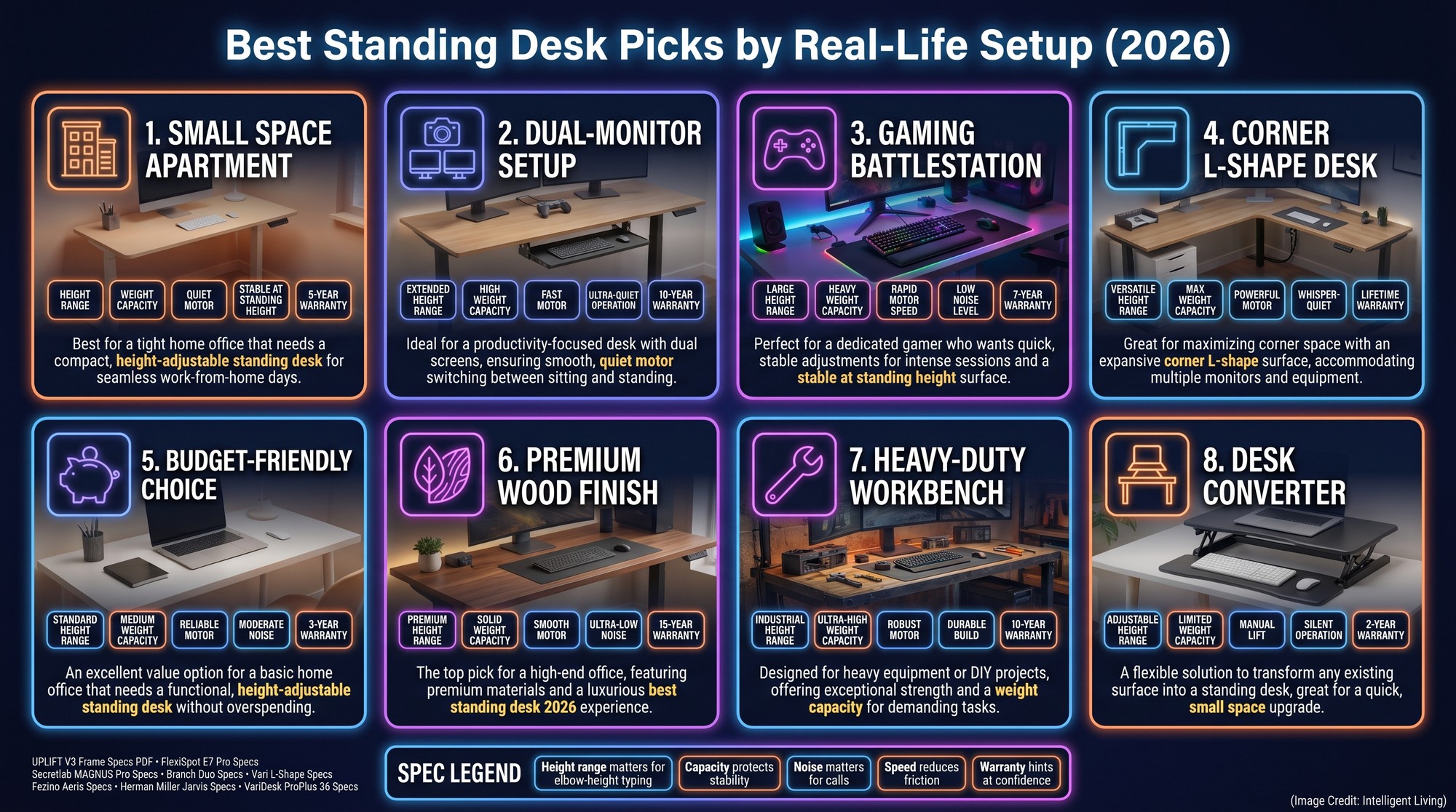
Top-Rated Standing Desks for 2026: Our Best Picks by Use Case
Our recommendations prioritize real-world scenarios over brand marketing, aligning with common search intents like selecting a workstation optimized for dual-monitor configurations that ensures your gear remains organized and stable.
1. Best All-Around Stability and Height Range: UPLIFT V3 Review
For a typical home office with one or two monitors, the UPLIFT V3 height and stability specs are built around broad fit, strong stability, and a height range designed to cover most users. Standard electric frames like the V3 work well for people who want one reliable platform for calls, writing, and light creative work.
- Why it wins: customizable sizes and tops, strong stability at standing height, and programmable height presets that simplify switching.
- What to watch for: assembly can take time, and customization options may raise the final price.
Bedroom offices often require a desk to serve as a storage surface; in these setups, Uplift’s a stable frame is vital when supporting monitors, docks, and notebooks simultaneously.
If the desk shakes at standing height, it becomes the kind of purchase that gets “used later,” which usually means never.
2. Best Compact Standing Desk for Minimalist Apartment Setups: Branch Duo
In compact apartments or shared spaces, footprint often dictates the final setup. The compact design of the Branch Duo serves smaller rooms without sacrificing the motorized transitions needed for an active workday.
- Motorized height adjustment for easy transitions.
- Straightforward control interface for quick presets.
- Tidy, minimalist aesthetic that blends into home decor.
Branch Duo’s combination ensures you keep the core sit-stand benefit even when your floor space is limited.
- What to watch for: lower weight capacity than heavy-duty frames, so very large rigs can push its comfort zone.
Narrow corner setups require careful attention to desk depth to ensure your screen stays at a comfortable viewing distance rather than feeling too close.
3. Top-Tier Gaming Workstation with Integrated Cable Management: Secretlab MAGNUS Pro
Gaming and streaming setups demand more than height adjustment. The MAGNUS Pro cable and load specs spell out why the desk shows up in serious setups, including integrated cable management, a built-in power column design, and a load rating tailored to stacked peripherals.
- Why it wins: cable routing and desktop organization that reduce clutter and accidental yanks.
- What to watch for: Magnus Pro’s pricing is higher than simpler frames.
When a desk is also a command center for long sessions, cable order becomes posture. Designing an ergonomic station for extended gaming sessions highlights how cable routing and monitor height reduce the tendency to hunch during intense play.
4. Best Heavy-Duty Standing Desk for Professional Creators: FlexiSpot E7 Pro
For creators, designers, and engineers with heavier equipment, weight capacity becomes critical. The reinforced frame design of the E7 Pro supports multiple monitors and heavy studio gear without compromising stability at full height.
- Why it wins: stronger lift system and a sturdier feel under real load.
- What to watch for: the footprint can be harder to fit into very small rooms.
On a desk that holds multiple displays plus studio gear, tiny vibrations show up in the fingertips and the eyes. FlexiSpot’s higher-capacity frame reduces this wobble to make standing work feel normal. This stability is essential during video editing, design work, or managing detailed spreadsheets.
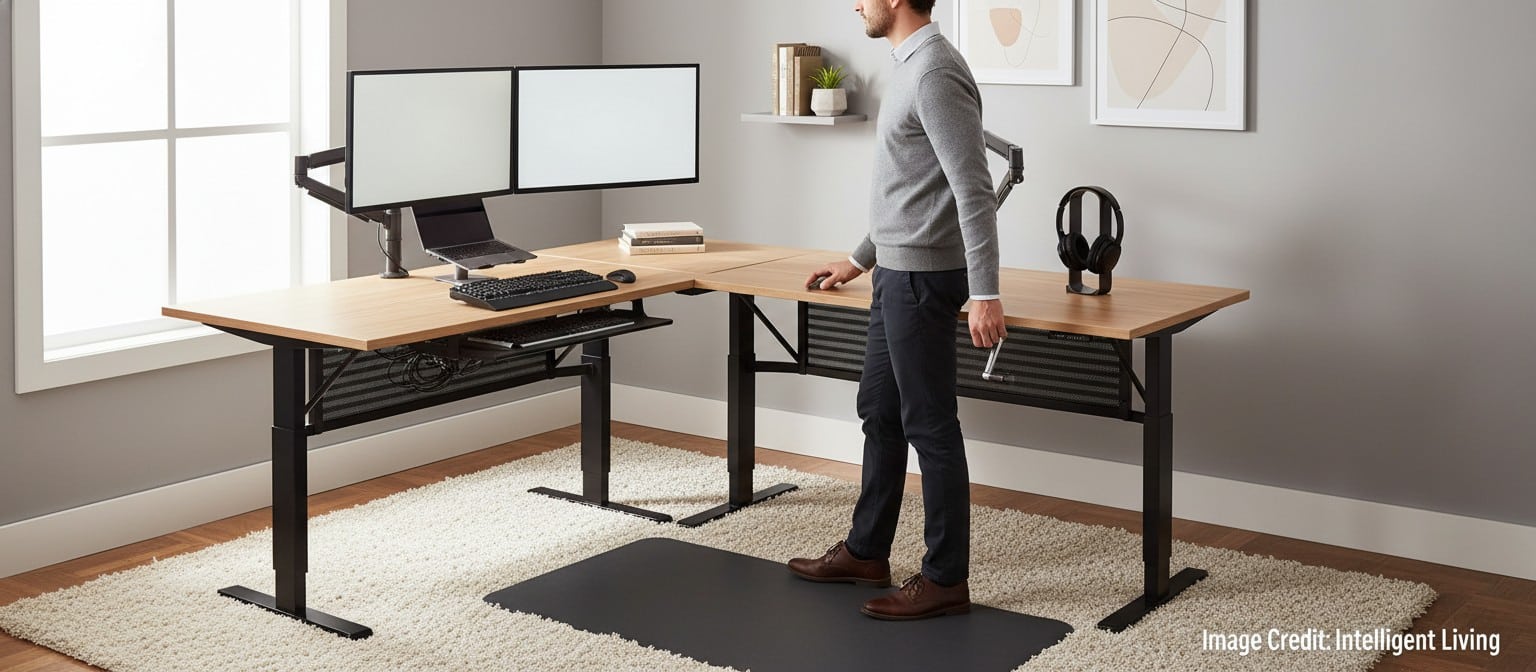
highlights practical setup choices that keep an ergonomic home office functional in 2026. (Credit: Intelligent Living)
5. Maximize Corner Productivity with the Vari L-Shape Electric Standing Desk
Corner spaces benefit from L-shaped standing desks that maximize surface area. The spacious configuration of the Vari L-shape desk provides ample room for multitaskers who split their day between laptop and monitor zones.
- Why it wins: space for multitasking setups without balancing devices on top of each other.
- What to watch for: room layout must allow the desk to rise without bumping shelves and wall-mounted storage.
In a corner office, the desk often becomes two workstations in one: a meeting zone on one side and a deep work zone on the other. The Vari L-shaped standing desk can reduce that constant shuffle of laptops and keyboards, which makes switching positions less disruptive.
6. Most Affordable Sit-Stand Entry Point: Fezibo Electric Standing Desk
Not every buyer wants to invest heavily at first. Budget-friendly models can make sense when the goal is to test a sit-stand routine. The Fezibo Aeris frame and load options show a typical starter profile, with a usable height range and multiple load options depending on the frame.
- Why it wins: a lower-cost on-ramp into switching positions.
- What to watch for: lighter frames can show more wobble at maximum height.
For someone trying to answer “is a standing desk worth it?” a budget model can make the habit change feel lower-risk. The key to Fezibo is keeping expectations realistic: lighter frames often work best with simpler gear, like a laptop plus one monitor rather than a fully loaded creator rig.
7. Refined Design and Premium Build Quality: Herman Miller Jarvis
For shoppers who want a refined build with long-term expectations, the Jarvis Bamboo build and motorized lift system offer a high-end configuration for those seeking both aesthetic appeal and heavy-duty performance.
- Why it wins: premium fit-and-finish and a strong spec profile.
- What to watch for: premium pricing.
In living spaces where the desk is always visible, materials and finish stop being cosmetic and start being part of daily comfort. Premium height-adjustable desks like Jarvis blend into residential spaces like high-end furniture, a crucial factor for bedrooms or open-plan offices.
8. The Best Sit-Stand Desktop Retrofit: VariDesk ProPlus 36 Converter
Replacing a desk is not always practical. Standing desk converters lift your keyboard and monitor area on top of an existing surface. The VariDesk ProPlus 36 sit-stand converter offers a straightforward way to retrofit an existing desk without a full-frame replacement.
- Why it wins: minimal setup and no full desk replacement required.
- What to watch for: reduced workspace depth compared to a full desk.
For someone working from a shared table in the evening, a converter can create a consistent ergonomic position without rearranging the entire room. A VariDesk also fits the common question, “what is the cheapest way to try a standing desk?” without committing to a full frame.

Choosing a Standing Desk that Fits Your Body and Setup
Key Specifications Checklist: 7 Factors to Consider Before Buying
Standing desk shopping can feel like a wall of numbers: weight capacity, height range, motor count, and controller options. The easiest way through is to match the specs to the real setup, including the gear on the desktop and the space around the desk. Using a structured shopping checklist keeps your decision grounded in practical ergonomics and daily functionality.
- Height Range: Ensure the desk supports both seated and standing ergonomic heights for your body.
- Weight Capacity: Add up monitors, laptops, desktop towers, and accessories.
- Motor Type: Dual or triple motors often provide smoother, quieter transitions than single-motor systems.
- Stability: Check for reinforced frames that minimize wobble at full height.
- Height Presets: Memory buttons simplify daily switching.
- Cable Management: Integrated trays or channels reduce clutter.
- Warranty and Support: Longer coverage often reflects confidence in build quality.
Evaluating critical factors when choosing a sit-stand desk reinforces the need to prioritize stability and height range for long-term use.
The 5-Minute Neutral Posture Calibration: Your Ergonomics Fit Check
Establishing a foundation for proper workplace ergonomics starts with elbow-height typing and correct limb alignment. Following OSHA standards for monitor height and distance ensures your screen placement supports neck comfort throughout the day.
Take five minutes to calibrate your station for better ergonomics:
- Stand upright with your shoulders relaxed.
- Adjust the desk height until your forearms are roughly parallel to the floor.
- Position the monitor so the top third of the screen aligns with your eye level.
Calibrating these points reduces the strain often blamed on the desk itself.
Skipping these alignment steps often leads to discomfort that users wrongly attribute to the desk itself. Prioritizing long-term prevention is essential. Understanding the common health risks associated with office work helps explain how small alignment errors can stack into chronic discomfort. Strategies for managing long-term back pain in the workplace emphasize that consistent ergonomic alignment is more effective than occasional posture checks.
Sustainable Standing Habits: How to Use Your Desk Without Fatigue
Start gradually. Alternate between sitting and standing every 30 to 60 minutes, and treat it as a circulation habit as much as a posture habit. Integrating habits that improve blood circulation during the workday can be as simple as calf raises and short walks between tasks.
Scheduling brief five-minute exercise snacks makes movement feel realistic, especially on busy days when motivation is low. A common rhythm is seated deep work, standing calls, and then a quick reset walk before the next block.
A typical routine might include seated work during focused writing, standing during collaborative calls, and a quick hallway walk after long sessions. Adopting daily habits to combat joint stiffness can prevent that locked-up feeling that often sets in by midweek.
Rather than aiming to stand more than everyone else, the objective is to feel less trapped in a single posture.

Designing an Active Workday: Integrating Movement into Your Workflow
Investing in a standing desk is an investment in your daily rhythm. A stable frame and intuitive height presets encourage the regular switching that protects your back and heart. By pairing a motorized desk with short exercise snacks, you transform a static office into an adaptable environment that supports your best work.
Configure specific presets for seated typing and standing calls to remove the friction of manual adjustment. Properly managing your presets ensures your ergonomic office setup remains active, helping you stay mobile throughout the day.
Essential Standing Desk FAQ for 2026
How long should I stand at a standing desk?
Aim to switch positions every 30 to 60 minutes to maximize circulation and avoid orthostatic strain.
Can a standing desk help with lower back pain?
Yes, by allowing frequent posture shifts that reduce pressure on the lumbar spine, provided your ergonomic setup is correct.
What is the best standing desk for small spaces?
Compact motorized frames like the Branch Duo offer full height range without overwhelming limited apartment footprints.
Are budget electric standing desks stable?
While budget models offer great sit-stand entry points, they may exhibit more wobble at maximum height compared to reinforced frames.
What accessories improve a sit-stand setup?
Anti-fatigue mats and monitor arms are the most effective additions for improving comfort during long standing sessions.
Disclosure: This post contains affiliate links, which means we may receive a commission if you click a link and purchase something that we have recommended. While clicking these links won’t cost you any extra money, they will help us keep this site up and running! Thank you for your support.


