
Four-tenths of a second. That is how long Google says it takes its new Gemini 3.5 Transcribe Live model to turn the end of a spoken sentence into clean, formatted text. Combined with a 2.6% word error rate on recorded audio and the ability to clean up filler words, fix self-corrections, and call other AI models on the fly, the August 26, 2026, launch marks a significant reset of where speech-to-text sits in the AI stack.
But the press release tells only half the story. Behind the headline numbers are two distinct API products, a smart-versus-verbatim trade-off that has not been widely discussed, hard session limits that will shape how teams deploy it, and a competitive picture in which Google is launching from a top-five position rather than the top of the leaderboard. Here is what Gemini 3.5 Transcribe actually is, what it costs, where it fits against Whisper, AssemblyAI, Deepgram, and Rev, and where teams should be careful before betting production pipelines on it.
What Is Gemini 3.5 Transcribe?
Gemini 3.5 Transcribe is Google’s latest dedicated speech-to-text model family, built by Google DeepMind and sold as a first-class member of the Gemini lineup. Unlike its predecessor Chirp 3, which was a standalone transcription engine, 3.5 Transcribe is positioned as a substrate for agent workflows rather than a finished text product. It is designed to read raw audio and emit polished, formatted prose in a single pass, then hand downstream work such as image generation or file analysis to other Gemini models through function calls.
The family ships as two distinct API products under the Gemini Audio banner, and choosing between them is the first architectural decision a developer makes:
- gemini-3.5-transcribe serves pre-recorded audio through the Interactions API. Send a file, get a finished transcript back with speaker attribution and word-level timestamps. This is the batch lane for meetings, call logs, podcasts, and archival audio.
- gemini-3.5-transcribe-live serves streaming audio through the Live API over WebSockets. It returns partial transcripts while the speaker is still talking and a final transcript shortly after each utterance ends. This is the real-time lane for voice agents, live captioning, and interactive assistants.
Both share the same underlying “intelligent transcription” engine: auto-formatting, filler-word cleanup, custom vocabulary, function calling, and automatic language detection across 85+ languages. They differ in latency, feature set, pricing, and hard limits, which is why the rest of this guide treats them as separate products with overlapping DNA.
Key Features That Set Gemini 3.5 Transcribe Apart
Google’s announcement leans heavily on the model’s ability to handle the messy reality of how people actually talk. Five capabilities define what 3.5 Transcribe does that earlier systems struggled with.
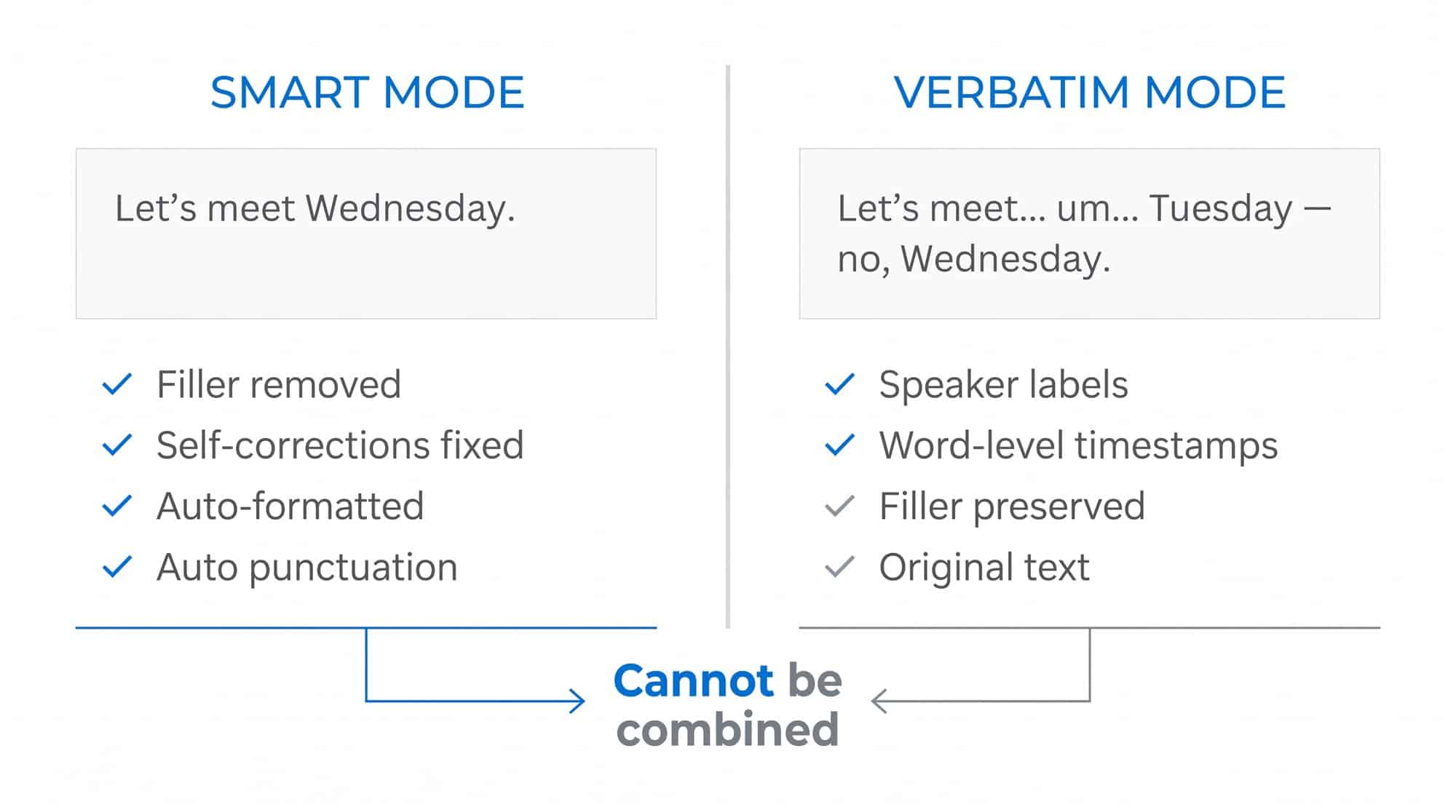
Smart disfluency cleanup. The model removes filler words such as “um” and “ah,” resolves self-corrections mid-sentence (so “let’s meet Tuesday, no, Wednesday” becomes “let’s meet Wednesday”), and applies punctuation and formatting on its own. There is a trade-off here that competitors have largely glossed over: Google’s smart cleanup cannot be combined with speaker diarization or word-level timestamps. If you need the timestamps or the speaker labels, you have to switch to verbatim mode and accept the false starts in the output.
Custom vocabulary up to 1,000 terms. The model accepts a list of specialized jargon, brand names, or unique spellings and biases its transcription toward them. This is the feature enterprise buyers will care about most, since it is the kind of domain accuracy that has kept vertical transcription vendors in business against general-purpose speech-to-text. Alphanumeric strings like postal codes and order IDs are also handled specifically, an area where Chirp 3 routinely failed in noisy real-world audio.
Automatic language detection across 85+ languages. Detection runs per utterance, so a bilingual conversation does not need a language setting. The model can also switch mid-session as a speaker changes language, which makes it usable on global calls and live captioning where the previous generation of transcription tools required a session per language.
Multi-speaker identification on recorded audio. The pre-recorded model attributes speech to up to three speakers with word-level timestamps attached to each. Support for four or more speakers is marked as experimental, so meeting recordings with large groups are not yet a safe fit. Speaker diarization is a feature of the batch model only; the streaming endpoint does not label speakers at all.
Function calling to other Gemini models. 3.5 Transcribe can delegate work to the rest of the Gemini family, so a transcribed voice command can trigger image generation, file analysis, or any other Gemini capability in the same workflow. This is currently live in the Gemini app on macOS, where the model powers the “Speak to Window” feature, and it is the clearest signal of Google’s broader bet that transcription is no longer a discrete product category but a building block for agent experiences.
Performance: WER Benchmarks and Latency
Google published concrete numbers in the launch announcement, measured by the independent evaluator Artificial Analysis. They are strong, but the surrounding context is important.
- 4.0% average word error rate (WER) in streaming mode.
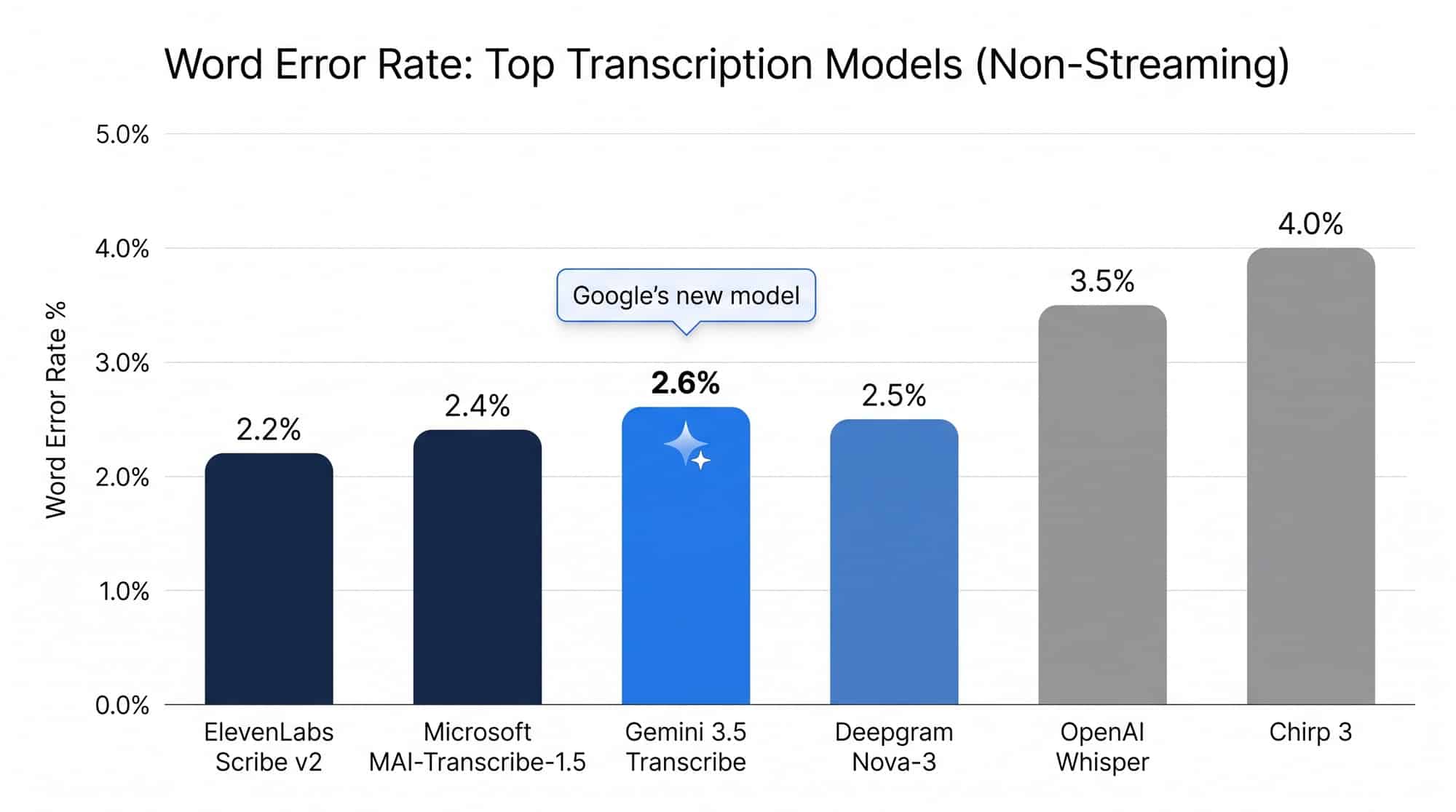
- 2.6% average WER in non-streaming mode.
- 70% improvement in time to final transcription versus Chirp 3, with the streaming variant hitting a 0.40-second final latency from the end of speech to a finished transcript.
- 5.50% WER streaming and 5.04% WER non-streaming on the FLEURS multilingual benchmark, across a set of top languages and locales, both improving on Chirp 3.
Two caveats are worth noting. First, the 4.0% streaming and 2.6% non-streaming numbers are not directly comparable. Streaming transcription operates under a tougher constraint (it must produce text before the speaker has finished), so the same model will always look worse on the streaming number than the batch number. Second, while Google frames the 2.6% figure as a category-leading result, the public Artificial Analysis leaderboard shows ElevenLabs Scribe v2 at 2.2% WER and Microsoft MAI-Transcribe-1.5 at 2.4% sitting ahead of Gemini 3.5 Transcribe in the non-streaming lane at launch. The streaming number is in a separate regime where no comparable head-to-head against the incumbent streaming APIs has been published.
Multilingual accuracy also still trails the flagship English numbers by roughly two to three percentage points. A developer building a global call-center pipeline will get noticeably better results on English audio than on, for instance, Vietnamese or Thai, and that gap has not closed with this release.
For real-time applications, the latency improvement is arguably the more important number. A 70% reduction in time to final transcription is the difference between a voice agent that feels responsive and one that feels like it is buffering. The 0.40-second streaming latency, in particular, is what makes sub-second conversational turns possible for the first time on Google’s own API surface.
Two Models, Two Endpoints: Which One Should You Use
Picking the right endpoint is the highest-leverage decision a team will make when adopting Gemini 3.5 Transcribe. The two products look similar on paper but carry different contracts once you start building.
Pre-recorded audio: Gemini 3.5 Transcribe
Send a file, get a transcript. The batch endpoint accepts up to 60 minutes of audio per request, dropping to 30 minutes when speaker diarization or word-level timestamps are enabled. It returns speaker attribution for up to three speakers, word-level timestamps, custom vocabulary, and function calling. This is the right model for:
- Meeting transcripts and call logs.
- Podcast and interview transcription.
- Archival audio and bulk processing jobs.
- Anywhere the transcript is the deliverable, not an intermediate product.
Real-time streaming: Gemini 3.5 Transcribe Live
A WebSocket connection carries a continuous audio stream to the model, which returns partial transcripts as the user speaks and a final transcript shortly after each utterance ends. The Live API is built for sub-second conversational turns. It also carries the most important engineering limits Google has not put in the press release:
- 10-minute session cap. A single Live session lasts at most ten minutes. Continuous audio beyond that means the application must chunk, reconnect, and stitch transcripts itself, which is real engineering for any workload that runs long, such as a support call or a lecture capture.
- No speaker diarization. The streaming endpoint does not attribute speech to speakers. If a real-time transcript needs to know who said what, the labeling has to happen in your own stack or in a downstream pass.
- No word-level timestamps. The Live path does not return timestamps. Applications that need time-aligned output, such as subtitles synced to media, cannot get it from this endpoint.
For real-time plus speaker labels, Google currently has no single endpoint. Teams that need both will have to run the streaming model for low latency and a separate batch pass for attribution or build their own diarization layer on top.
Pricing and API Access
Google prices audio in tokens, at a published rate of 25 audio tokens per second of input. The current Gemini Enterprise Agent Platform pricing page lists the following rates for the two endpoints during public preview:
- gemini-3.5-transcribe-live: $3.50 per million audio input tokens and $21.00 per million text output tokens, blending to roughly $0.009 per audio-minute.
- gemini-3.5-transcribe: $2.50 per million audio input tokens and $12.00 per million text output tokens, blending to roughly $0.005 per audio-minute.
Both models are available with a free tier during public preview. Access is open today through the Gemini API in Google AI Studio and Google Antigravity for developers, through the Gemini Enterprise Agent Platform for enterprise workloads, and through consumer surfaces for end users. On the consumer side, the same engine already powers:
- Gboard Rambler on Android, in select countries and languages.
- The Gemini app on macOS for voice-driven workflows and the “Speak to Window” capability.
- Google Antigravity’s prompt box for voice-driven development.
- Chrome talk-to-type in any web field, “coming soon,” per Google.
It is also rolling out to Search Live, Gemini Live, Google Docs, Keep, and Gmail, according to coverage of the launch, though some of those integrations remain unconfirmed at the time of writing.
How Gemini 3.5 Transcribe Compares to Whisper, AssemblyAI, Deepgram, and Rev
Google is launching into a transcription market that is more crowded than the press release suggests. The relevant comparison is not just against Chirp 3, but against the open-source and specialized-vendor incumbents that have defined the category. The table below summarizes where 3.5 Transcribe sits against the field on the dimensions that matter to developers.
| Criterion | Gemini 3.5 Transcribe | Chirp 3 (previous Google) | OpenAI Whisper | ElevenLabs Scribe v2 | Microsoft MAI-Transcribe-1.5 | Deepgram Nova-3 |
|---|---|---|---|---|---|---|
| Streaming WER | 4.0% (AA) | Improved upon | ~5–10% (varies by deployment) | Not published | Not published | ~3.5% (vendor) |
| Non-streaming WER | 2.6% (AA, #5 at launch) | Higher than 3.5 | ~3–5% (English) | 2.2% (AA) | 2.4% (AA) | ~2.5% (vendor) |
| Time to final transcript | 0.40s live; 70% faster than Chirp 3 | Baseline | Depends on hardware | Sub-second | Sub-second | Sub-second |
| Filler removal + formatting | Built in (smart mode) | Not a core feature | Requires post-processing | Built in | Built in | Built in |
| Languages | 85+ auto-detected | 100+ | 99 | 30+ | 50+ | 30+ |
| Speaker diarization | Up to 3 (batch only) | Limited | Via pyannote (external) | Up to 32 | Up to 8 | Up to 64 |
| Custom vocabulary | Up to 1,000 terms | Limited | Prompt-based | Yes | Yes | Yes |
| Function calling to LLMs | Yes (native to Gemini) | No | No | No | No | No |
| Hosting | Google Cloud (managed) | Google Cloud (managed) | Self-hosted or API | Managed API | Azure (managed) | Managed API |
| Pricing (per audio-minute, blended) | ~0.005–$0.009 | Discontinued | $0.006 (Whisper API) | ~0.016 | ~0.008 | ~0.0043 |
The takeaway is that Gemini 3.5 Transcribe is competitive but not category-leading. Its strongest differentiators are native function calling into the Gemini ecosystem and a managed billing surface that ties transcription to the rest of the Gemini API. Its clearest gaps are the limited speaker diarization ceiling (three speakers in batch, zero in streaming), the 10-minute streaming session cap, and the fact that the non-streaming accuracy number is best-in-class only relative to Chirp 3, not the broader field.
Real-World Use Cases Where Gemini 3.5 Transcribe Fits
For voice agents and conversational interfaces, the streaming model is the most direct fit. Voice agents need sub-second transcript latency to feel responsive, and the function-calling capability means a single Gemini stack can handle both the transcription and the agent logic. Early platform integrations through Agora, Fishjam, LangChain, LiveKit, Pipecat, Vercel, and Vision Agents are already shipping on top of the Live API. The same pipeline pattern is powering voice features elsewhere: DeepSeek is gray-testing in-app voice chat in its consumer app, while developers build their own voice stacks on speech-to-text models like this one.
For call centers and post-call analytics, the batch model is the better choice. Speaker attribution, word-level timestamps, custom vocabulary for product names and order IDs, and the 60-minute file cap are all aligned with the realities of recorded call audio. Enterprises in healthcare, financial services, and customer support are the natural buyers, and the named launch customers (Vivo, Intellitek Health, Lingopal) hint at where Google expects the early enterprise revenue to come from.
For content creators and accessibility, the smart-mode transcription cleanup is the headline feature. Podcasters, YouTubers, and journalists who have spent years hand-editing filler words and self-corrections out of transcripts get a real-time saving. The caveat is that switching to verbatim mode is required for any workflow that needs exact word timing, which limits how much the smart cleanup can do for live captioning in media production.
For multilingual meetings, the 85+ language support and per-utterance language detection make the batch model usable on global calls where the previous generation required a separate session per language. Multilingual accuracy is still two to three percentage points worse than English, so teams with heavy non-English workloads should still run a small benchmark on their own audio before committing.
Limitations and What to Watch
Three constraints deserve attention before any team builds a production pipeline on top of Gemini 3.5 Transcribe.
Smart mode and verbatim mode cannot be combined. If you want speaker labels or word-level timestamps, the model must switch to verbatim mode, which means the filler-word cleanup and self-correction resolution are turned off. There is no “clean up the transcript but keep the speaker labels” option today. For use cases that need both polished text and attribution, this is a meaningful limitation.
The streaming endpoint has hard limits that production systems will hit. The 10-minute session cap forces any longer workflow to chunk, reconnect, and stitch transcripts. The lack of speaker diarization on the live path means attribution has to come from somewhere else. The lack of word-level timestamps rules out time-aligned use cases such as subtitle generation. None of these are deal-breakers, but they all require the application to do work that the API does not do.
The published benchmarks were chosen and published by Google. Artificial Analysis is independent of Google, but the measurements were commissioned and selected by Google on a model that had been callable for a day. Independent reproduction on real-world audio is the only way to know how the 4.0% streaming figure will hold up in production, and that data does not yet exist. Treat the published numbers as a strong early signal, not a settled fact. Note the contrast with music: while Gemini handles spoken words, dedicated AI music transcription converts songs into MIDI and sheet music.
Beyond these, three things to watch in the months ahead: whether the 10-minute session cap survives the move from public preview to general availability, whether the smart-versus-verbatim trade-off gets a “best of both” option, and whether Google holds the list price when the preview ends. Preview-to-GA pricing is the variable that will most determine whether developers migrate off existing pipelines.
Frequently Asked Questions
What is the difference between Gemini 3.5 Transcribe and Gemini 3.5 Transcribe Live?
Gemini 3.5 Transcribe handles pre-recorded audio and returns transcripts with word-level timestamps and speaker labels for up to three speakers. Gemini 3.5 Transcribe Live is the streaming version, sending partial transcripts over a WebSocket with sub-second latency and a final transcript roughly 0.40 seconds after each utterance ends. Both cover the same 85+ languages and both support custom vocabulary and function calling, but they carry different limits: the batch model accepts up to 60 minutes per file (30 with diarization), while the live model caps sessions at 10 minutes and does not provide speaker attribution or word-level timestamps.
How much does Gemini 3.5 Transcribe cost?
During public preview, the batch model costs roughly $0.005 per audio-minute blended, and the live model costs roughly $0.009 per audio-minute blended. Both have a free tier today. Pricing is based on audio input at 25 tokens per second, so list prices are $2.50 per million tokens for batch audio input and $3.50 per million tokens for live audio input, with corresponding text output rates. Preview-to-GA pricing has not been confirmed.
How many languages does Gemini 3.5 Transcribe support?
Gemini 3.5 Transcribe automatically detects and transcribes more than 85 languages, including regional accents and diverse dialects. Detection runs per utterance, so a single session can switch between languages as a speaker changes.
Can Gemini 3.5 Transcribe identify multiple speakers?
Yes, on the pre-recorded model. Speaker attribution is supported for up to three speakers with word-level timestamps attached to each. Support for four or more speakers is marked as experimental, and the live streaming endpoint does not perform speaker diarization at all.
Is Gemini 3.5 Transcribe better than OpenAI Whisper?
On the published benchmarks, yes. Google’s 2.6% non-streaming WER and 4.0% streaming WER both outperform typical Whisper deployments, and the managed API surface removes the self-hosting overhead. On the other hand, Whisper’s open weights are free, runs anywhere, and integrates with a much larger open-source ecosystem. For teams already standardized on OpenAI’s API surface or needing on-premises deployment for compliance reasons, Whisper remains a better fit.
What did Gemini 3.5 Transcribe replace?
Gemini 3.5 Transcribe replaces Chirp 3, Google’s previous transcription model released in 2025. Google reports a 70% improvement in time to final transcription over Chirp 3, alongside better handling of background noise, domain jargon, and disfluency cleanup. Teams already running on Chirp 3 are the clearest audience for the migration.
The Bottom Line
Gemini 3.5 Transcribe is a serious addition to Google’s developer stack because it is the first Google speech-to-text model that is genuinely sold as a Gemini model. It plugs into the same API surface as the rest of the family, picks up native function calling for free, and offers a streaming latency figure that finally puts Google in the same conversation as the specialized transcription vendors. It is not a category leader on raw accuracy; ElevenLabs Scribe v2 and Microsoft MAI-Transcribe-1.5 still post lower WER numbers, and the smart-versus-verbatim trade-off forces real product compromises.
For voice agents and conversational AI on the Gemini platform, it is the obvious choice. For high-accuracy transcription on English audio in a managed setting, it is competitive. For multi-speaker transcription beyond three people, for any workflow that needs smart cleanup and speaker attribution at the same time, or for any production system that runs longer than 10 minutes on a single streaming session, the limitations will require either workarounds or a different tool. The model is callable today, the numbers are strong, and the most useful thing a team can do in the next month is run its own real-world audio through both endpoints and see whether the published benchmarks hold up where it matters.
For a deeper look at how Gemini 3.5 Transcribe fits into the broader Gemini platform story in 2026, see our Gemini vs. ChatGPT comparison, which covers the wider competitive landscape. The most recent headline in that platform story is the September 2 launch of Gemini 3.8 Flash, the third Flash release in six weeks and the model that now drives the intelligence-per-dollar lead at the Flash tier. Teams comparing transcription stacks may also want to revisit our coverage of Google’s broader 2026 AI update wave, where Gemini 3.5 Transcribe sits alongside Lyria 3 Pro, Gemma 4, and the rest of the Gemini Audio lineup.


