
Agnes Image 2.5 Flash is the newest image model in Sapiens AI’s Agnes family, and it is aimed squarely at developers who want fast, cheap, high-detail image generation and editing through a single API call. It supports text-to-image, image-to-image transformation, and multi-image composition, and it runs on a single B200 GPU with FP8 quantization.
This article walks through what the model actually is, how to call the API, what it costs, and where it stands against the better-known image models. All images in this article were generated by Agnes Image 2.5 Flash itself, and they are assessed honestly below, flaws included.
What Is Agnes Image 2.5 Flash?
Agnes Image 2.5 Flash (model ID agnes-image-2.5-flash) is a first-generation agentic image generation and editing model from Sapiens AI, a Singapore-based AI lab. It was released in July 2026. It is the latest generation of the company’s image line and builds on Agnes Image 2.1 Flash, keeping the same request contract while improving generation quality across its supported workflows.
The model can do three things in one pipeline:
- Text-to-image: generate a new image from a natural-language prompt.
- Image-to-image: transform, redraw, or restyle an existing image while preserving its composition.
- Multi-image composition: combine two or more reference images into a single new image.
Its core strength is spatial understanding. It can locate and modify specific objects inside an image, and it can render text within the image, including multilingual text. That makes it useful for product mockups, campaign posters, and any visual where readable in-image text matters.

Key Specifications at a Glance
The table below summarizes the model’s technical profile. It is compiled from the official documentation and the Sapiens AI model page.
| Property | Value |
|---|---|
| Model ID | agnes-image-2.5-flash |
| Developer | Sapiens AI (Agnes family) |
| API endpoint | POST /v1/images/generations |
| Release | July 2026 |
| Works | Text-to-image, image-to-image, multi-image composition |
| Output tiers | 1K, 2K, 3K, 4K |
| Aspect ratios | 1:1, 3:4, 4:3, 16:9, 9:16, 2:3, 3:2, 21:9 |
| Run time | Single NVIDIA B200 GPU, FP8 quantization |
| Latency | About 566 ms per step on an 8x B200 system |
| Output format | Image URL or Base64 |
| List price | From about $0.010 to $0.024 per image, by tier |
| Current price | All tiers currently free |
How to Call the API
Every request goes to a single endpoint. You send a JSON body with a model name, a prompt, and a size tier, and the service returns the generated image either as a hosted URL or as Base64.
Basic text-to-image request
curl https://apihub.agnes-ai.com/v1/images/generations \
  -H "Authorization: Bearer YOUR_API_KEY" \
  -H "Content-Type: application/json" \
  -d '{
    "model": "agnes-image-2.5-flash",
    "prompt": "A cinematic product hero image for a desktop monitor, clean lighting, high detail",
    "size": "2K",
    "ratio": "16:9",
    "extra_body": { "response_format": "url" }
  }'
For image-to-image or multi-image composition, you pass the input images through extra_body.image. That field accepts an array of public HTTPS image URLs or Data URI Base64 strings. One image triggers a transformation; two or more triggers a composition.
Image-to-image request
curl https://apihub.agnes-ai.com/v1/images/generations \
  -H "Authorization: Bearer YOUR_API_KEY" \
  -H "Content-Type: application/json" \
  -d '{
    "model": "agnes-image-2.5-flash",
    "prompt": "Transform the scene into a rain-soaked cyberpunk night with neon reflections while preserving the original composition",
    "size": "2K",
    "ratio": "16:9",
    "extra_body": {
      "image": ["https://example.com/input-image.png"],
      "response_format": "url"
    }
  }'
Two details that cause most integration errors
- Keep response_format inside extra_body. Placing it at the top level of the request body is the single most common mistake. Use extra_body.response_format: “url” for URL output and “b64_json” for Base64.
- Do not send a tags field for image-to-image. The old contract required tags: [“img2img”], but this model does not. It only needs the input image array.
The response returns a data array. The generated image is at data[0].url for URL output or data[0].b64_json for Base64. A revised_prompt field may also be present when the model adjusts your prompt internally.
Pricing: From a Few Cents to Free
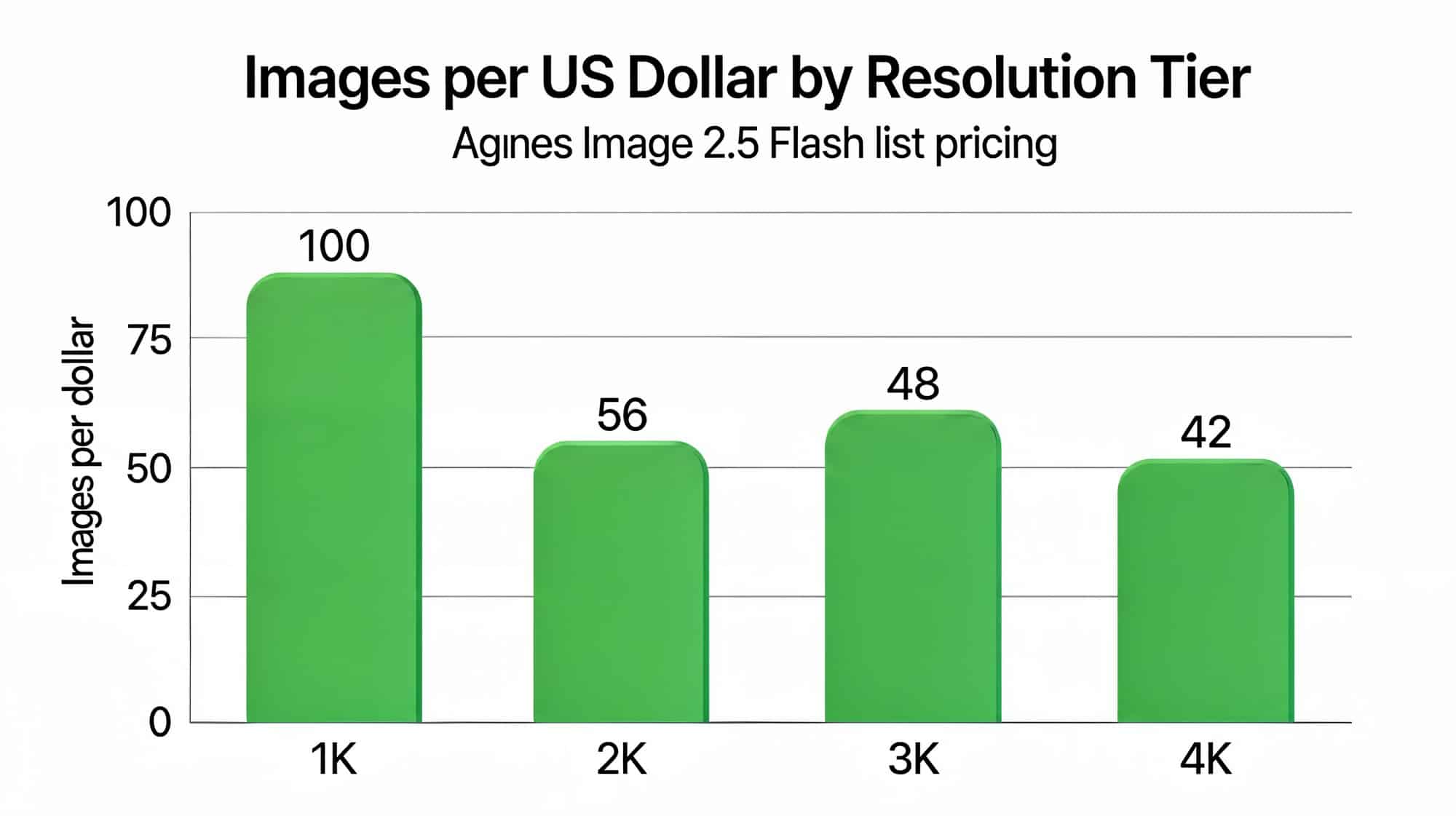
The “flash” in the name signals the fast, low-cost tier of the Agnes image line. At list price, the model bills by output resolution: roughly $0.010 for a 1K image, $0.018 for 2K, $0.021 for 3K, and $0.024 for 4K. The first three input reference images are included at no extra charge.
That list price is the headline. At the 2K tier, a single Nano Banana 2 image costs roughly five times as much as an Agnes image, and the margin widens further at 1K. On top of that, Sapiens AI is currently running a promotion that makes all output tiers and input reference images free, so a developer building a high-volume pipeline can test the model at zero marginal cost today, with the list prices as the fallback rate once the promotion ends. For teams that want free to mean permanent rather than promotional, open weights are the other path: MOSS-Image, the 5B Apache 2.0 text-to-image model from OpenMOSS, carries no per-image price at all when self-hosted.
How It Compares With the Leading Image Models
Agnes positions 2.5 Flash against two of the most widely used image models: Google’s Gemini Nano Banana 2 (Gemini 3.1 Flash Image) and OpenAI’s GPT Image 2.0. The official claim is that 2.5 Flash outperforms both, plus Qwen Image, on editing fidelity, text precision, and overall quality, and that it offers sub-second latency at 2K resolution.
Cost is where the gap is easiest to see. Google prices Nano Banana 2 at roughly $0.067 per 1K image and $0.101 per 2K image. Agnes’s list price for a 2K image is about $0.018, before the current free promotion. That is an order of magnitude cheaper at the 2K tier, even at list price.
The tradeoff is maturity. The established models have years of developer ecosystem, stable pricing history, and broad integration support. Agnes is newer and smaller, so the cost advantage comes with a less proven track record. For many teams, the practical path is to use the free window to run real workloads and judge output quality on their own use cases.
Prompting for Better Results
Like other modern image models, 2.5 Flash responds best to a structured prompt. For text-to-image, the documentation recommends a clear order of description:
- Subject
- Scene or environment
- Style
- Lighting
- Composition
- Quality requirements
For image-to-image, the key shift is to state explicitly what should change and what should stay the same. A prompt like “turn the daytime street into a cyberpunk night scene, add neon signs and wet road reflections, while preserving the original street layout and building shapes” gives the model clear guardrails. For multi-image composition, describe the role of each reference and how they should combine in the final result.
Because the model is optimized for high-information-density visuals, complex scenes with many layered elements are a strong fit. The more you spell out the visual hierarchy, the better the result.
Who It’s For and Where It Shines
At its list price, and with speed as a core design goal, 2.5 Flash targets a specific set of jobs. The official documentation points to five use cases that map to its stated strengths of spatial edits, in-image text, and dense compositions.
- Creative design: concept art, visual exploration, and poster drafts where a designer can iterate quickly at low cost.
- Marketing content: campaign images, product visuals, and social media creatives that need in-image text rendered accurately.
- High-density visuals: detailed scenes, complex environments, and rich compositions with many layered elements.
- Image transformation: style transfer, scene relighting, and background swaps that preserve the original layout.
- Product visualization: product photos, mockups, and commercial visuals across multiple reference items.

The common thread is volume and iteration. A team producing thousands of images a day gains more from a sub-cent, sub-second model than from a premium one, so the economics favor it for production pipelines, personal projects, and prototyping. For occasional, hero-level one-off shots where maximum polish outweighs cost, a heavier model may still be the better fit.
How the Generated Samples Hold Up
Every image in this article was generated by 2.5 Flash itself, with one exception: the interactive price chart above, which is rendered directly from the underlying pricing data rather than by any image model. The Agnes-generated samples tell a two-sided story. Layouts and colors come out clean, and most text is legible, but precision is not there yet.
- Text errors: the bar chart’s subtitle misspells the model name as “Agines”, and the infographic renders one capability label as “Image–to-Image” with a doubled hyphen.
- Chart proportions: the bar lengths do not match the printed values or the y-axis. The bar for 48 is taller than the bar for 56, and the bar for 100 stops short of its gridline.
- Fine human details: in the cafe photo, the left figure’s hair changes length between the camera-facing side and the far side, fingers merge into a coffee cup handle, clasped fingers jumble together, and a watch strap blends into skin. Skin reads slightly waxy up close.
The chart problem is not unique to Agnes. Data charts are a known weak spot across image models from Google, OpenAI, Microsoft, Grok, and others, with the same length-versus-value drift documented in our tests of GPT Image 2.5 Flare and Sunburst. Spelling errors in rendered text are similarly common across providers.
The photorealistic sample also trails the best premium models at full zoom: convincing at a glance, but behind on texture and anatomy. The 3D render is clean and pleasant, if basic, with the background tools melting into the workbench.
The mitigating factor is pace. Agnes Image 2.0 Flash arrived at the end of May, 2.5 Flash followed in July, and the company’s text models ship frequently, including the recent Agnes 3.0 Flash. An image model on the 3.0 generation may not be far off, and the flaws above are exactly the kind that a generation or two of iteration can chip away at.
In the meantime, it remains free to use. For anyone with basic image requirements, zero cost plus a simple API is hard to beat, as long as every output is checked before it ships.
Frequently Asked Questions
What is the model ID for Agnes Image 2.5 Flash?
The model ID is agnes-image-2.5-flash. You send it in the model field of every request.
How much does Agnes Image 2.5 Flash cost?
At list price it costs about $0.010 for a 1K image up to $0.024 for a 4K image, with the first three input reference images included. During the current promotion, all output tiers and input reference images are free.
Can it edit existing images or only generate new ones?
It does both. It generates new images from text and transforms existing ones through image-to-image. For editing, you pass the source image via extra_body.image and describe what to change while preserving what should stay the same.
What aspect ratios and sizes does it support?
It supports four resolution tiers (1K, 2K, 3K, 4K) and eight aspect ratios, from 1:1 up to a 21:9 ultra-wide. The most common workflow is to request a tier like 2K at 16:9 and crop or resize downstream if you need an exact canvas size.
How does it compare to Nano Banana and GPT Image?
Agnes claims better editing fidelity and text precision, plus far lower cost. At list price a 2K image costs about $0.018, versus roughly $0.067 to $0.101 for the leading Google model. The main caveats are that Agnes is newer, has a shorter track record, and its sample outputs still show occasional text and proportion errors.
Where can I read the official documentation?
The full API reference, size tables, and request examples are on the official Agnes Image 2.5 Flash docs page. Pricing is on the Agnes model pricing page.
The Bottom Line
Agnes Image 2.5 Flash is a fast, extremely cheap image model whose samples are serviceable but not yet at the level of the best premium models on fine detail. Layouts, stylized renders, and most text come out clean, while hands, hair, chart proportions, and the occasional spelling slip break down in familiar ways. The free pricing makes it a low-risk trial for anyone with basic image requirements, and the integration contract is simple enough that a working pipeline is a single API call away.
The wider context is useful too. Agnes is part of a broader push from Singapore’s AI scene, and a related text model, Agnes 2.5 Pro Beta, has already drawn attention for its aggressive pricing. For anyone building image-heavy products or high-volume creative pipelines, the 2.5 Flash model is worth a look during its free window. You can explore other low-cost image options, such as MAI-Image-2.6, to compare approaches.
As with any new model, the responsible move is to test it on your own workloads before committing, and to keep an eye on when the promotion ends so you can budget against the list prices.


